


Backbone — Next-Level Play
4.63.24K Reviews
App Specs
- Version
- 1.15.7
- Updated On
- License
- Free
- Downloads
- 500,000+
- Developer
- Backbone
- Categories
- Social
- Platform
- Android, iOS
Screenshots
 Analysis by AppCompare
I judge Backbone — Next-Level Play mainly by one promise: making phone games feel better to control through a Backbone controller. That focus matters because a controller can change not only how a game responds, but whether I want to play it on a phone at all. The app is free to install, and Backbone, its developer, positions it as a social gaming app as well as a companion to its hardware. I would think of it less as a replacement for every gaming app and more as a home base for people who already enjoy playing on mobile and want a more deliberate setup.
Making phone gaming feel more like a dedicated session
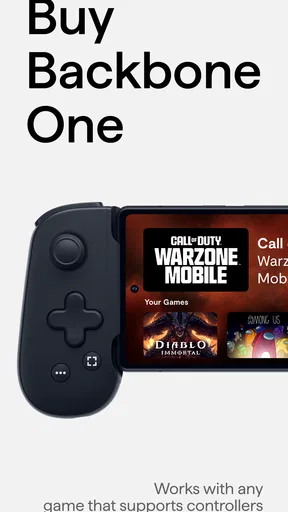
The central appeal is simple: pair the app with a Backbone controller and use physical controls instead of relying entirely on a touchscreen. That can make familiar games feel more comfortable, especially when on-screen buttons cover part of the action or when precise inputs are awkward with thumbs on glass. I would not assume that every mobile game benefits equally, though. A controller is most useful when a game is designed to accept one; for a title built around tapping and swiping, the change may be small or even unnecessary.
Getting Started with Backbone
First things first, the setup is a breeze. You just download the app, connect your Backbone controller, and you’re ready to dive into a whole new world of gaming. The app itself is intuitive, offering a seamless connection between your phone and the controller. I was up and running in no time.
In everyday use, I’d treat setup as the start of a routine rather than a one-time reason to buy in. Before settling in for a longer session, I’d check that the game I plan to play works well with controller input and that the phone is seated comfortably. That small check can save the annoyance of discovering mid-session that a particular game still expects touchscreen gestures for important actions. If you mostly play short, casual games that already feel natural on glass, keeping the usual touch controls may be simpler.
Design and Interface
The interface is sleek and user-friendly. You’re greeted with a dashboard that neatly organizes all your games, making it super easy to navigate. Whether you’re a fan of action-packed shooters or relaxing puzzle games, everything is just a tap away. The design is clean, which makes the experience even more enjoyable.
A hub like this is most useful when it reduces the little bits of friction between deciding to play and actually starting a game. I’d use the dashboard to keep the games I return to easy to find, rather than treating it as a reason to browse endlessly. For a phone with a crowded home screen, having gaming gathered in one place can make a controller session feel intentional. It is less compelling if you already have a simple, well-organized library and rarely switch between games.
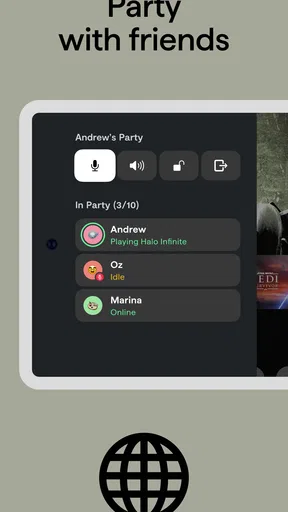
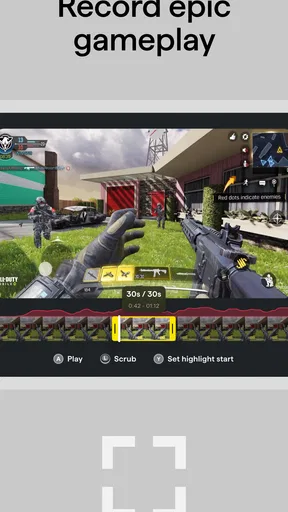
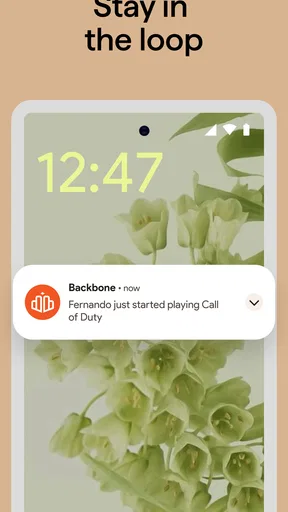
One feature that caught my eye is the integrated social features. You can easily share screenshots and clips with friends or even jump into a game together. It’s like having a mini gaming community right at your fingertips.
Worth Reading Before You Choose

EA SPORTS FC Mobile 26 Is a Bigger Football Game, but It Takes Time

Flipboard Shows What News Apps Must Do Beyond the Feed

Switching to Android Auto Means Rethinking Your Driving Routine

Google Calendar Makes a Crowded Week Easier to Manage

Ludo King Makes the Most of the Minutes Between Plans

Baby Panda World Brings Quick Play to Modern Phones, but Its Game Library Feels Busy
That social angle can be handy when a good moment is worth sharing without turning the whole evening into a complicated streaming setup. I’d still think about the audience before sharing clips, and I would use the feature when it adds to a conversation rather than posting everything automatically. For someone who prefers private, solo play, the social layer may be easy to ignore; it is not the main reason I would choose the app.
Performance and Compatibility
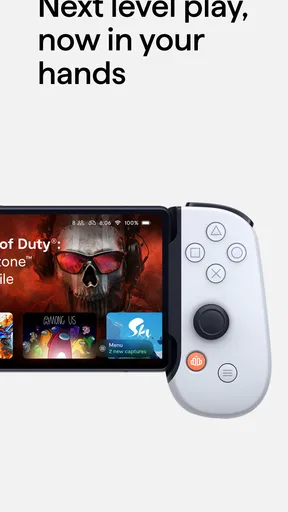
Now, let’s talk about performance. The responsiveness of the Backbone controller is impressive. There’s no noticeable lag, which is crucial when you’re in the middle of an intense gaming session. It feels just like using a console controller, but on your phone.
That feeling depends on the game and the whole setup, so I would avoid treating a controller as a universal fix for every control problem. A physical layout can help with sustained play and precise inputs, but it cannot make a game’s menus or touch-only actions disappear. When I’m choosing what to play away from home, I’d favor a title I already know works comfortably with the controller instead of experimenting when I have only a few minutes.
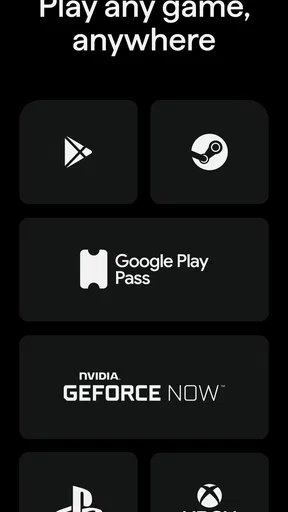
Compatibility-wise, it supports a wide range of games. Whether you’re playing the latest AAA titles or indie games, the experience is consistently smooth. I tried it with a few different games, and each one felt like it was meant to be played this way.
In practice, I’d keep expectations tied to individual games, not just their genre or size. Two action games can handle input differently, and a game that looks suited to a controller may still have touch-focused screens or interactions. The useful habit is to test a new title in a low-pressure moment, then remember which ones are comfortable for longer play. That makes the app’s library feel more like a practical launch point than a guarantee that every game will behave identically.
Unique Features
One of the standout features is the Backbone app’s ability to transform your phone into a personal gaming hub. You can access game recommendations, stream directly to platforms like Twitch, and even join voice chats with friends. It’s like having a gaming console packed into your pocket.
Those extras make the most sense for someone who already wants to share or coordinate gaming, not for a player who simply wants a controller shortcut. Streaming and voice chat can turn a solitary commute or quiet break into a more social session, but they also add steps and distractions. I’d start with the basic play experience, then bring in those tools only if they make a real difference to how I spend time with friends.
The app also offers personalized game recommendations based on your preferences and past gameplay. This is a nifty feature for those who are always on the lookout for something new to try.
I’d use recommendations as a discovery aid, not as a verdict on what I should play. They can help surface something when I’m in the mood to browse, but a recommendation still has to fit the time I have, the controls I prefer, and whether I want a solo or shared session. If I already know exactly what I want to play, going straight to that game is the faster choice.
User Experience
The overall user experience with Backbone is top-notch. The combination of the physical controller and the app provides a level of control and immersion that’s hard to achieve with a touchscreen alone. It’s perfect for those long gaming sessions where precision and comfort are key.
One realistic use case is an evening when I have a little time to unwind but do not want to sit at a desk or turn on a separate console. I can pick up my phone, use the controller-supported game I already know, and settle into a focused session. The trade-off is that the app cannot make a phone a larger screen or remove the need to manage battery and connectivity as I normally would. For a long play session where those practical limits matter, a console or computer may be the more comfortable choice.
Plus, the app’s social features make it easy to connect with friends and share your gaming moments, which adds another layer of enjoyment to the experience.
Compared with the usual alternatives, Backbone occupies a middle ground. Touch controls are convenient because they require no extra controller, and they remain the natural option for games built around taps. A standard mobile game launcher may be enough if all I need is a list of installed titles. Backbone is more appealing when I want controller-centered play gathered with social and discovery tools; it is less persuasive if I do not own or plan to use its controller, or if I prefer a separate console ecosystem.
There are a few practical questions I’d settle before making it part of my routine. Does a particular game accept controller input? I’d check by trying it before relying on it for travel or a timed break. Is the app worth opening for someone who plays alone? It can still serve as a gaming hub, though the social features matter less. Do recommendations replace searching the app store? I would not count on that; I’d treat them as another way to browse. And if all I want is to play a quick touch-first puzzle, I’d skip the extra setup and launch the game directly.
Who Gets the Most from It
I think the strongest fit is someone who already enjoys mobile games, owns a Backbone controller, and regularly plays titles where physical input makes a noticeable difference. It may also suit friends who like exchanging clips, joining voice chats, or finding something new to play together. The app’s Teen age rating is worth keeping in mind for families deciding whether its social and gaming environment is appropriate for a younger user.
People who should pause before committing are those who rarely play on their phones, mainly choose games designed for touch, or do not want another layer between their games and the phone’s normal interface. Backbone is free, but in-app purchases are listed at $39.99 per item, so I would check the purchase details before buying anything and decide whether the extra value fits my own habits. The app has a 4.6 average from around 20,000 ratings, with roughly 3,100 written reviews and over 500,000 installs; that suggests plenty of interest, but it does not tell me whether my particular games will suit a controller.
For an interested player, the sensible approach is to start with one game that clearly benefits from physical controls and see whether the full routine feels easier: opening the hub, choosing a title, and playing with the controller. If that becomes a natural way to use the phone, recommendations and social tools can add value over time. If I still reach for touch controls out of habit, the app’s broader features may not justify changing how I play.
Final Thoughts
In conclusion, Backbone — Next-Level Play truly elevates mobile gaming. It brings a console-like experience to your smartphone, making it a must-have for any serious mobile gamer. The seamless integration of hardware and software, along with the robust feature set, makes it stand out in the crowded world of gaming apps.
If you’re looking to take your mobile gaming to the next level, I’d definitely recommend giving Backbone a try. It’s a fantastic blend of convenience, performance, and social connectivity that’s sure to enhance your gaming sessions.
Pros
- Seamless integration with multiple games.
- Customizable controls for personalized play.
- High-quality build and ergonomic design.
- Supports cloud gaming services.
- Compatible with both iOS and Android.
Cons
- Limited compatibility with some devices.
- Requires frequent firmware updates.
- Battery life could be longer.
- No Android app for some features.
- Higher price than similar controllers.
FAQs for Backbone — Next-Level Play
What is Backbone — Next-Level Play?
Backbone — Next-Level Play is an innovative app designed to enhance mobile gaming experiences by transforming your smartphone into a gaming console. It offers seamless integration with popular gaming platforms, providing a unified interface for gaming enthusiasts. Users can connect their devices, access a library of games, and enjoy features like game recording and social connectivity.
Is Backbone compatible with all smartphones?
Backbone is primarily designed for iOS devices, specifically iPhones. However, its compatibility can vary depending on the model of the iPhone. It is essential to check the specific requirements on the app’s official site or app store listing to ensure your device supports all features and functionalities.
Do I need any additional hardware to use Backbone?
Yes, Backbone requires a physical controller that attaches to your iPhone, transforming it into a handheld gaming device. This controller is an essential part of the Backbone experience, providing tactile controls and enhancing gameplay. The app itself is free, but the controller must be purchased separately.
Can I use Backbone with my existing gaming accounts?
Absolutely. Backbone allows users to integrate their existing accounts from various gaming platforms, such as Xbox, PlayStation, and Apple Arcade. This integration enables seamless access to your game library, achievements, and friends, making it easier to continue gaming sessions across different devices.
Does Backbone offer any social features?
Yes, Backbone includes robust social features that allow you to connect with friends, share gaming sessions, and join multiplayer games. You can also record gameplay, create highlights, and share them directly on social media. This makes it a great tool for gamers who enjoy connecting and competing with others.


